How to Install .NET Desktop Runtime (Windows)
The .NET Desktop Runtime is required to run Windows desktop applications built with WPF or Windows Forms (such as ATS desktop apps).
📥 Step 1: Download .NET Desktop Runtime
A) From ATS Downloads: https://account.algotradingsystems.net/Secure/Downloads
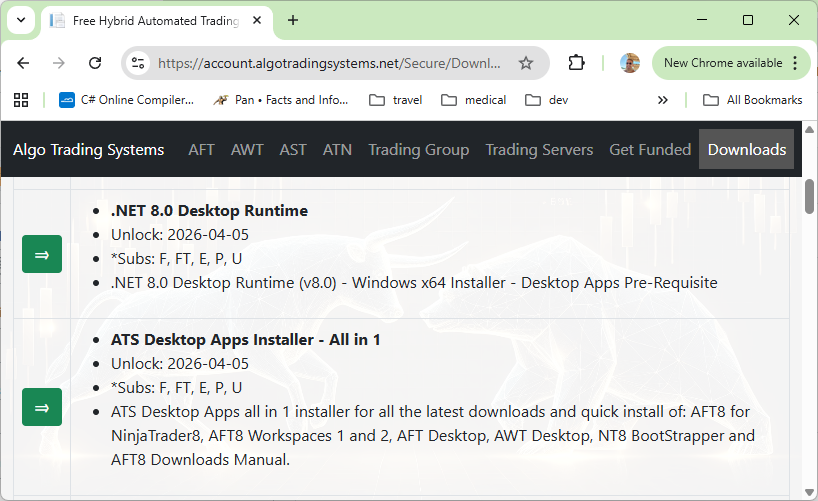
B) From the MicroSoft official Microsoft download page:
- Go to the official Microsoft download page: https://dotnet.microsoft.com/en-us/download/dotnet
- Scroll down to Run apps – Runtime
- Net 8: https://dotnet.microsoft.com/en-us/download/dotnet/8.0
- Net 10: https://dotnet.microsoft.com/en-us/download/dotnet/10.0
- Download the Windows x64 installer
⚙️ Step 2: Install the Runtime
- Run the downloaded installer file
- Click Install
- Wait for the installation to complete
- Click Close
No restart is usually required.
✅ Step 3: Verify Installation
To confirm installation:
- Open Command Prompt
- Run the following command:
dotnet --list-runtimes
You should see something similar to:
Microsoft.WindowsDesktop.App 8.0.x
⚠️ Important Notes
- Install Desktop Runtime (not just ASP.NET or SDK)
- Required for apps built with WPF / WinForms
- You can have multiple .NET versions installed side-by-side
🧩 Troubleshooting
-
App won’t start: Ensure .NET Desktop Runtime 8 is installed (not just SDK)
-
Wrong version installed: Reinstall and select version 8.x
-
Still not working: Restart your PC and try again
🚀 Quick Summary
Download → Install → Verify → Run your app
