Futures Contract Rollovers
On contract expiry messages from NinjaTrader, you will need to roll your contracts to the latest and download the data.
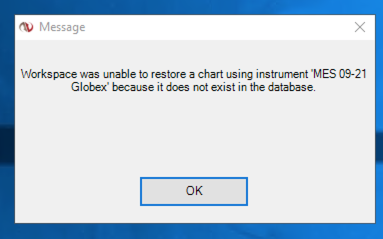
To use the AFT7 updated workspace, you will need to roll over your contracts in the instrument list, then open the workspace, or you will get errors such as:
For assistance with NinjaTrader rolling, please see here: https://ninjatrader.com/support/helpGuides/nt7/rolling_over_a_futures_contrac.htm
You may also need to download 8 days of historical tick data: https://ninjatrader.com/support/helpGuides/nt7/download.htm
Then change the charts on your workspace or open the new workspace.
Close the workspace if you are getting any errors about "unable to find instrument" - roll over the contract and get the data, then open the workspace.
AFT Support
Free Users - This guide should resolve any data/connection problem. If not, please contact NinjaTrader Support for platform and connection assistance. support@ninjatrader.com
Premium/Ultimate users can obtain 1-to-1 in-depth tailored support. Please contact the AFT Help Desk: https://algofuturestrader.zendesk.com/
Help, Support & Trading Education Resources
Can’t find what you need? Browse our futures trading help guides and tutorials, ask the ATS AI Help Bot, submit a technical support request, or join the ATS Discord trading community.
Talk to Us — Free Discovery Call
Talk to a real ATS futures trader with no obligation. Book a free Discovery Call to discuss your trading goals, see ATS products in action, review pricing, explore futures prop-firm trading, and choose the best route for self-assisted onboarding or fast-track 1-to-1 Assisted Trade Mastery.
📅 Book a Free Discovery Call
Fast-track your progress with structured 1-to-1 Assisted Trade Mastery. Get help setting up ATS trading systems, learning the hybrid futures trading methodology, using turnkey NinjaTrader workspaces, developing your trade plan, and preparing for simulator, prop-firm, or live trading.
Get Assisted with Trade Mastery
Get Started Trading Futures
Start free with self-assisted AI onboarding for experienced futures traders and advanced NinjaTrader users, or fast-track your progress with 1-to-1 Assisted Trade Mastery to get set up, oriented, and ready to trade in seven days.
Get Started Trading Futures
ATS uses and recommends QuantVPS trading servers for low-latency futures trading. Use our partner link and coupon code ATS to receive the available ongoing partner discount.
QuantVPS — Coupon: ATS
ATS uses and recommends Top One Futures. Use coupon code ATS for special pricing and promotional offers available through our official partner link.
Top One Futures — Coupon: ATS
Partner links may provide ATS with compensation when qualifying purchases are made, at no additional cost to you.