
Get Started Self-Assisted
Get started day trading 100% FREE forever with real deal systems until real money trading - self-assisted installation & onboarding, setup ready to trade turnkey indices futures systems.
Pre-requisites for installation and configuring with the recommended settings for the Windows operating system and NinjaTrader Platform before installing AFT8.
Windows Operating System
Configuration is accessed via the Windows Settings:
Note TimeZone: Some users use Eastern Standard Time instead of Central US - the rule is if you are not seeing a date-time issue such as wrong start times or wrong gap times, it's okay to stick with it.
- Windows Version: 8 or later
- Time zone: Central US
- Region: United States
- Language: English (United States)
Download and Install NinjaTrader 8
Download NinjaTrader for unlimited FREE use PLUS FREE LIVE MARKET DATA!
- Get the NinjaTrader 8 Platform and Free demo data from ninjatrader.com
- Enter email to receive install instructions and data feed setup
- Check Yes, I would like to receive FREE LIVE MARKET DATA
NinjaTrader 8 Data Connection
Control Center > Connections > Add a Connection
- Add and configure a connection. See NT Connection Guides
NinjaTrader 8 Options
Options and settings are accessed via the NT8 control center. Leave all installation defaults plus verify or set as follows:
Control Center > Tools > Options > General
-
Confirm on window or tab close: On
- Language: English
- TimeZone: Central Time
Note: Some users use Eastern Standard Time instead of Central US
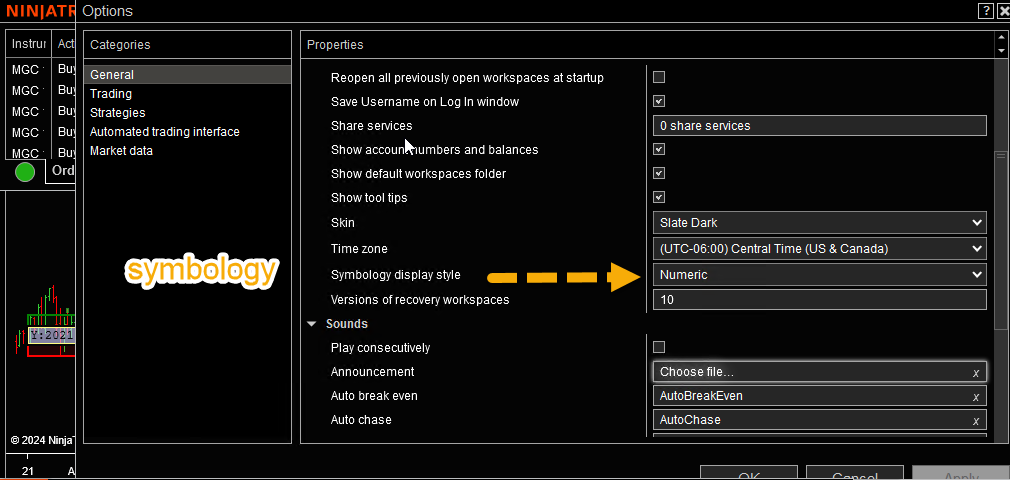
Options > General > Symbology: Numeric
CRITICAL: Set the instrument contract to numeric
Sim 101 - Multi-Provider Account Connection
Control Center > Tools > Options > Trading
- Confirm order placement: Off
- Start in Global Sim Mode: On
Control Center > Tools > Options > Market Data
- Get Data From Server: On
- Global Merge Policy: Merge Back Adjusted
- Download COT data at Startup: On
NT8 Instrument List Setup
Control Center > Tools > Instrument List
- Add a new list at the bottom left > AFT8
- Click OK and select the list
- Add instruments to the list on the right
-
Instruments to add depending on your choice:
- Oil: CL / MCL
- Dax: FDAX / FDXS
-
US Indices Emini/Micro
- MidCap: EMD
- S&P 500: ES / MES
- Nasdaq: NQ / MN
- Small Cap: RTY / M2K
- Dow: YM / MYM
NT8 Download Historical Data
Connect NT8 to Data - Control Center > Connect > Your Connection
Control Center > Tools > Historical Data > Load
- Instrument > Select > AFT8 > Select All
- Start Date: 15 days plus - back from End Date Today
- Tick, Minute, Daily
- Download
NT8 Pre-Requisites Conclusion
- You are now good to go to install the AFT8 system.
- If you were installed with different settings, change them as above and download the data again.