
- CRITICAL Uninstall: How to uninstall ATS Desktop Apps from Windows
- Re-Install ATS Desktop Apps: How to install the ATS Desktop Apps?
ATS AlgoFuturesTrader Desktop version 20243243 update optimized loading and VIP template sync hotfix
- Network acceleration is used for faster installation and updating of all ATS desktop apps
- ATS.AlgoFuturesTrader.Desktop
- ATS.AlphaWebTrader.Desktop
- ATS.NT8.BootStrapper
- VIP templates/workspaces sync to NinjaTrader 8
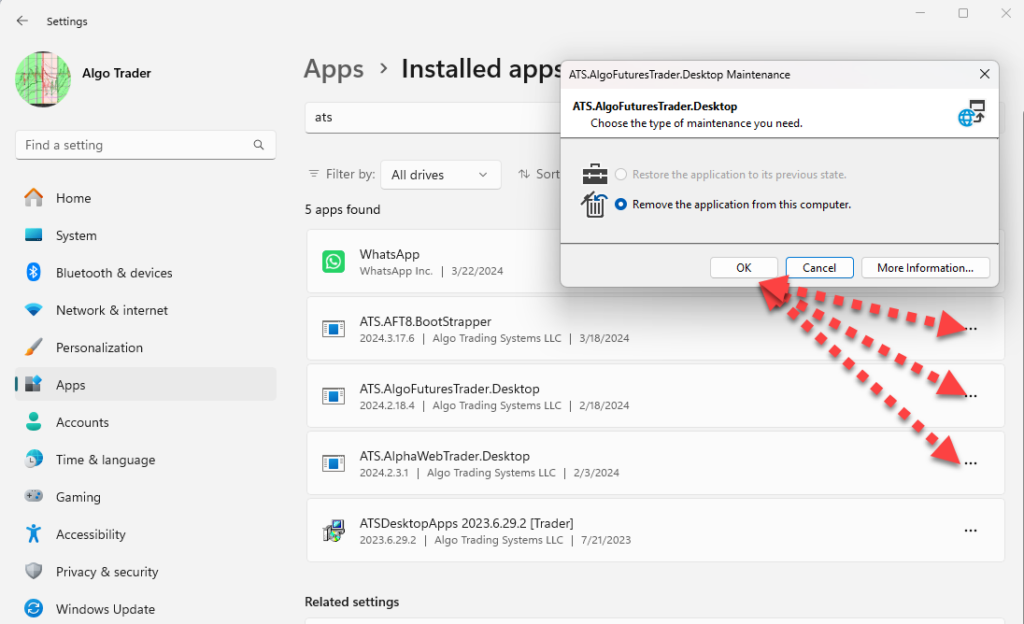
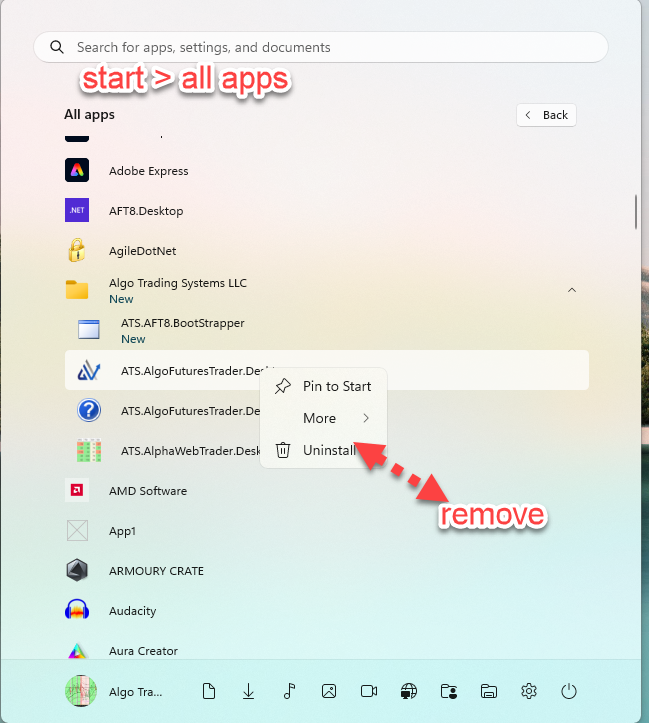
Uninstall: Remove the old version of ATS.AlgoFuturesDesktop and all ATS Desktop apps
- The prior version of ATS.AlgoFuturesDesktop and all ATS desktop apps must be removed from either of:
- Windows/Apps/Add remove
- Windows start > Apps menu
Install the new version of ATS.AlgoFuturesDesktop
- CRITICAL Uninstall: How to uninstall ATS Desktop Apps from Windows
- Re-Install ATS Desktop Apps: How to install the ATS Desktop Apps?